Gamma Lift in Vimeo Player

Gamma Lift in Vimeo Player

Anyone out there know why Vimeo lifts your gamma upon upload? The files look great on the desktop and then once they're in Vimeo's Flash Video format, the images always look brighter and with milkier blacks. It almost looks like it's adding 7.5 IRE Setup. Weird.

Any enlightening information and/or workarounds would be tremendously appreciated. 

Enough to give you a heart attack

Enough to give you a heart attack

Here is a Quicktime proxy file shot with a Mysterium-X upgraded R1. Quicktime version on the machine is the most current as is the QT R3D Codec.

g3.jpg

Nice look, eh?

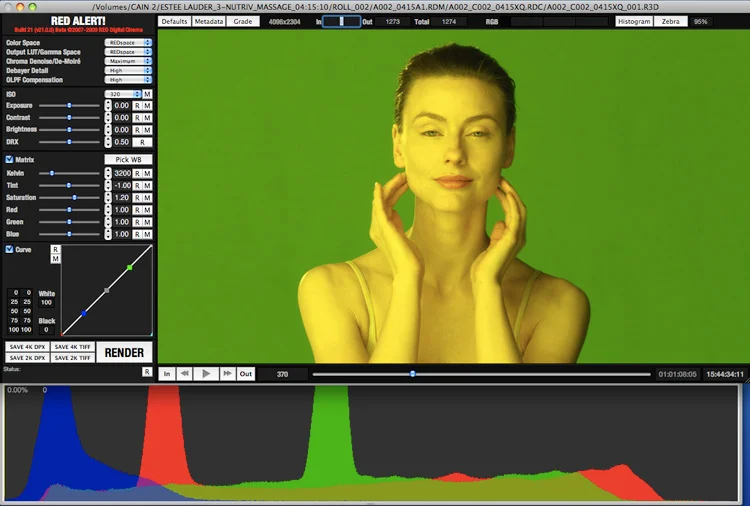
The same media opened in RedAlert.

g2.jpg

And now opened in RedCine-X v2

g1.jpg

And finally, a QT processed in Cine-X to ProRes.

g5.jpg

That's fine and dandy that you need to use the new software to work with the Mysterium-X files but a little head's up on RED's part would have been nice. I'm sure a few hours of combing posts on Reduser.net would yield an answer on this but if you had no idea that you have to process the media this way and aren't that RED savvy, like 90% of the people who ultimately have to deal with the files, opening up these new Quicktime proxies will definitely give you a good jolt. Honestly, the RED camera is still very intimidating to a lot of people, both production and post. They don't know the best way to work with the one light grading tools, file rendering software, offline to online process, or even how to optimally shoot the camera. If they didn't know they had to open these files in Cine-X and tried to re-color balance the images with the old tools, they would find it an impossible task. That's the thing people need to keep in mind about RAW, just because it's RAW doesn't mean that any problem can be magically "fixed in post". These are words I'm coming to loathe as too often I hear this when sloppy, irreversible mistakes are made on set. As the new workflows evolve, there is obviously a lot of ignorance on what really can be done in post production to salvage compromised images. Time and money being the key factors as extensive color correction in a traditional post production facility is enormously expensive. At least for the next few months anyways.. http://www.studiodaily.com/main/news...ion_12156.html

More on this later.

Red Build 30: Quick Thoughts

Red Build 30: Quick Thoughts

I've been spending the week with a Mysterium-X upgraded R1 and my brain is flooded with commentary. Expect something more in depth soon but for now, wanted to share a few impressions.

-I miss redspace and rec709 Video View. Redcolor takes a little getting used to. It's not a very faithful colorspace and because there's no way to affect the linear matrix beyond basic saturation and phase controls on the video tap, the live picture requires a little imagination on the part of the client, production, etc. I'm not sure why they dropped the other LUT's in the camera but kept them in the software. If they want everyone to use RedColor, great, but at least give us the tools to make the monitor look like the colors people are seeing. This is critical for product shots! 

-Increased sensitvity and noise reduction improvements are fantastic. You can safely "ride the ISO" now from 100 to 800. That's 3 stops of play on the lens. So if you find you need to shoot at a deeper stop you can set the T stop and then find an ISO that will put you back to your exposure and the difference in sensor noise is negligible. This is huge because of the time it saves. No more walking lights closer or further out, just make the camera more sensitive and stop down. Huge!

-You have to process all R3D files in Redcine-X now. I kind of liked the simplicity of RedAlert but I'm getting into the newest build of Cine-X. The previous version of it was nightmarish but v2, the version you have to comb posts on reduser.net to find (why not just put it on the website?), is fantastic. Slick interface and intuitive image controls. Love it. BUT default gamma and color space for file processing is now Redcolor and Redgamma. These look very plasticky and gross to me. Now when i process files I've been putting everything in 709 and then using the new Lift, Gamma, Gain controls to set the look. I tried to use redcolor and redgamma to get a nice, natural look but there was just something wrong about it. The tonality is very strange.

Love to hear other people's thoughts on this.

Also, why are the QuickTime proxies yellow now?